Sunday, January 2, 2022

VPC peering


What is VPC

Take a small piece of AWS network and call it your own, control IP address ranges, routing patterns, tighten security etc.

AWS definition: “Amazon VPC lets you provision a logically isolated section of the Amazon Web Services (AWS) cloud where you can launch AWS resources in a virtual network that you define.”

Every account has a default VPC in every region. Your resources are created in this default VPC.


What  is VPC Peering

VPC Peering: IPV4 or IPV6 traffic routes between VPCs created to establish communication between one or more multiple VPCs.

AWS definition: “A VPC peering connection is a networking connection between two VPCs that enables you to route traffic between them using private IPv4 addresses or IPv6 addresses. Instances in either VPC can communicate with each other as if they are within the same network. “

  • Through VPC Peering, traffic stays within the AWS network and not go over the internet.
  • Non-overlapping CIDRs – The 2 VPCs you are trying to peer, must have a mutually exclusive set of IP ranges.
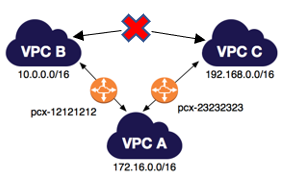
  • Transitive VPC Peering – not allowed i.e

To understand what is transitive peering, Please refer to the following image.

(If VPC A & B have peered and VPC A & C have peered, VPC B & C cannot share contents until there is an exclusive peering done between VPC B & C)
As mentioned earlier VPC peering can be done to another region or another account as well.

There are two VPCs isolated by default ( as it supposed to be ) but with a help of this peering connection, we are going to allow Traffic between these two VPCs.

There are multiple possibilities and scenarios when it comes to VPC peering in AWS.

  • You can connect two VPCs in two different AWS account
  • You can establish peering relationships between VPCs across different AWS Regions (also called Inter-Region VPC Peering).
  • You can connect two or more number of VPCs together
  • One, two or multiple VPCs peered together.

For this article, we are going to take the simple VPC peering within the same AWS account.

Ref:

https://www.middlewareinventory.com/blog/aws-vpc-peering-tutorial/


Elastic IP


  • IP address is used to communicate with the servers or to establish connection between the machines.
  • Difference between elastic IP and public IP
 Public IPElastic IP
It is assigned to your launched instance. It is assigned to your AWS account.
when an instance is terminated the public IP attached to it gets released  and further when you relaunch the same instance new IP address is assigned. Elastic IP do not change and they remain same even if you terminate the instance and later again restart the same instance.
  • Use case:

           Elastic IP is used  when you are working on long time project and configuration of IP sometime consumes more time.                      

           Public IP is used when you are working on small projects and running 2-3 servers. Here in this situation you make use of IP             for short time.

  • Do remember one thing if you have elastic IP in your account and its not in use,then you will be charged for it.    

Saturday, January 1, 2022

VPC endpoints and vpc costing

 VPC endpoint enables creation of a private connection between VPC to supported AWS services and VPC endpoint services powered by PrivateLink using its private IP address. Traffic between VPC and AWS service does not leave the Amazon network.

There are two types of VPC endpoints:

Interface endpoint is an elastic network interface (ENI) with a private IP address from the IP address range of user’s subnet that serves as an entry point for traffic destined to a supported service. It enables you to privately access services by using private IP addresses.

Gateway endpoint is a gateway that you specify as a target for a route in your route table for traffic destined to a supported AWS service. Currently supports S3 and DynamoDB services.


VPC Endpoints Limitations

  1. VPC endpoints support IPv4 traffic only.
  2. Endpoints are supported within the same Region only. You cannot create an endpoint between a VPC and a service in a different Region.
  3. Endpoints cannot transfer an endpoint from one VPC to another, or from one service to another.

Interface Endpoints:

  1. For each interface endpoint, you can choose only one subnet per Availability Zone.
  2. Each interface endpoint can support a bandwidth of up to 10 Gbps per Availability Zone by default. Additional capacity may be added automatically based on your usage.
  3. Interface Endpoint supports TCP traffic only.
  4. Endpoints cannot be transferred from one VPC to another, or from one service to another.

Gateway Endpoints:

  1. Endpoint connections cannot be extended out of a VPC i.e. resources across the VPN connection, VPC peering connection, AWS Direct Connect connection cannot use the endpoint


VPC Security

While private subnets help protect your resources by making them harder to access, this is not enough security. We also have to use other tools such as Security Groups, Network Access Control Lists (NACLs), and Flow Logs.

Security Groups and NACLs act as firewalls and extra security layers, giving you complete control over what traffic is allowed in and out of your VPC and within your VPC.

Flow Logs allow you to capture information about IP traffic flowing between your network interfaces, which you can then analyze to detect anomalies.

Important information about NACLs

NACLs:

  • Are at the subnet level - you assign one NACL to one or more subnets
  • Have inbound and outbound rules - ie: allow this traffic to come in, but it can't go back out or vice-versa
  • Allow everything by default
  • Are stateless - traffic allowed one way has to also be allowed the other way

Important information about Security Groups

Security Groups:

  • Are at the instance level (get evaluated after NACL) - you assign a Security Group when you create an instance, so each instance can have a different SG
  • Deny everything by default, you can only specify allow rules
  • Are stateful: traffic allowed one way is also allowed the other way
  • Important information about NACLs

    NACLs:

    • Are at the subnet level - you assign one NACL to one or more subnets
    • Have inbound and outbound rules - ie: allow this traffic to come in, but it can't go back out or vice-versa
    • Allow everything by default
    • Are stateless - traffic allowed one way has to also be allowed the other way

    Important information about Security Groups

    Security Groups:

    • Are at the instance level (get evaluated after NACL) - you assign a Security Group when you create an instance, so each instance can have a different SG
    • Deny everything by default, you can only specify allow rules
    • Are stateful: traffic allowed one way is also allowed the other way

Pricing on VPC

Q. How will I be charged and billed for my use of Amazon VPC?

There are no additional charges for creating and using the VPC itself. Usage charges for other Amazon Web Services, including Amazon EC2, still apply at published rates for those resources, including data transfer charges. 

- If you connect your VPC to your corporate datacenter using the optional hardware VPN connection, pricing is per VPN connection-hour (the amount of time you have a VPN connection in the "available" state.) Partial hours are billed as full hours. 

-Data transferred over VPN connections will be charged at standard AWS Data Transfer rates. For VPC-VPN pricing information, please visit the pricing section of the Amazon VPC product page.


NAT Gateway Pricing

- If you choose to create a NAT gateway in your VPC, you are charged for each “NAT Gateway-hour" that your gateway is provisioned and available. 

- Data processing charges apply for each gigabyte processed through the NAT gateway regardless of the traffic’s source or destination.

 Each partial NAT Gateway-hour consumed is billed as a full hour. You also incur standard AWS data transfer charges for all data transferred via the NAT gateway. If you no longer wish to be charged for a NAT gateway, simply delete your NAT gateway using the AWS Management Console, command line interface, or API.


Ref:
  • https://medium.com/awesome-cloud/aws-vpc-endpoints-overview-intro-getting-started-guide-91ca23b5af8d
  • https://www.linkedin.com/pulse/simple-explanation-vpcs-aws-cloud-practitioner-christophe-limpalair/


Saturday, July 31, 2021

Heap sort vs merge sort vs quick sort

 Sorting is well researched area in the history of computer science and mathematics, so there are a lot of algorithms for sorting. When comparing sort algorithms, I suggest categorizing them from the following view points.

  1. time complexity As already discussed in the other answers, the three algorithms are in average case O(nlogn) while quick sort worst case is O(n2).
  2. space complexity, especially if it's in-place sort Heap sort and quick sort can be done in-place. So they can directly work on the pre-allocated space where initial unsorted data is stored. While heap sort removes recursive calls by tail optimization and its space requirement is O(1), quick sort requires variables put on the stacks at each recursive step, so it requires in total O(logn) space. Merge sort is not in-place and requires additional O(n) space.
  3. external sort or not This means whether the algorithm works efficiently with external memory (e.g. HDD/SSD) which is slower than the main memory. Merge sort and quick sort are typical external sort since they can divide target data set and work on the small pieces loaded on memory, but heap sort is difficult to do that.
  4. stable or unstable As Karan Suraj mentioned Merge sort is only the stable sorting among the three.
  5. comparison based or not Some algorithms such as Radix sort don't depend on comparison of two elements, though the three in questions are all comparison based.

There are more properties for sort such as online and recursion, but these five are often discussed when we see multiple sort algorithms


ref:https://cs.stackexchange.com/questions/113070/difference-between-quick-sort-merge-sort-and-heap-sort

https://www.geeksforgeeks.org/time-complexities-of-all-sorting-algorithms/ (*************)

https://www.cs.auckland.ac.nz/software/AlgAnim/qsort3.html (****************)


Thursday, December 17, 2020

Array sorting in JavaScript

 REf:

 https://joel.net/custom-array-sort-algorithms-in-javascript


Complex Custom Sorting

I recently had a use case where an API was returning data that looked like this.

// API Response
["1", "10", "2", "BLA", "BLA2", "3"]

The Array contained all String items, but the business wanted the items to display like "1, 2, 3, 10, BLA, BLA2".

That meant, I had to detect when the String was a Number and Sort the "numbers" first and the text after.

As complex as that sounds, the sort algorithm wasn't too bad.

const isNumeric = (num) => !isNaN(num)

const customCompare = (a, b) => {
    if (isNumeric(a) && !isNumeric(b)) return -1
    if (!isNumeric(a) && isNumeric(b)) return 1
    if (isNumeric(a) && isNumeric(b)) return a - b
    return a < b ? -1 : 1
}

// [ '1', '2', '3', '10', 'BLA', 'BLA2' ]


Autoboxing and Unboxing

  Autoboxing  is the automatic conversion that the Java compiler makes between the primitive types and their corresponding object wrapper cl...